
Realization of a 3D Neon Road Sign Board
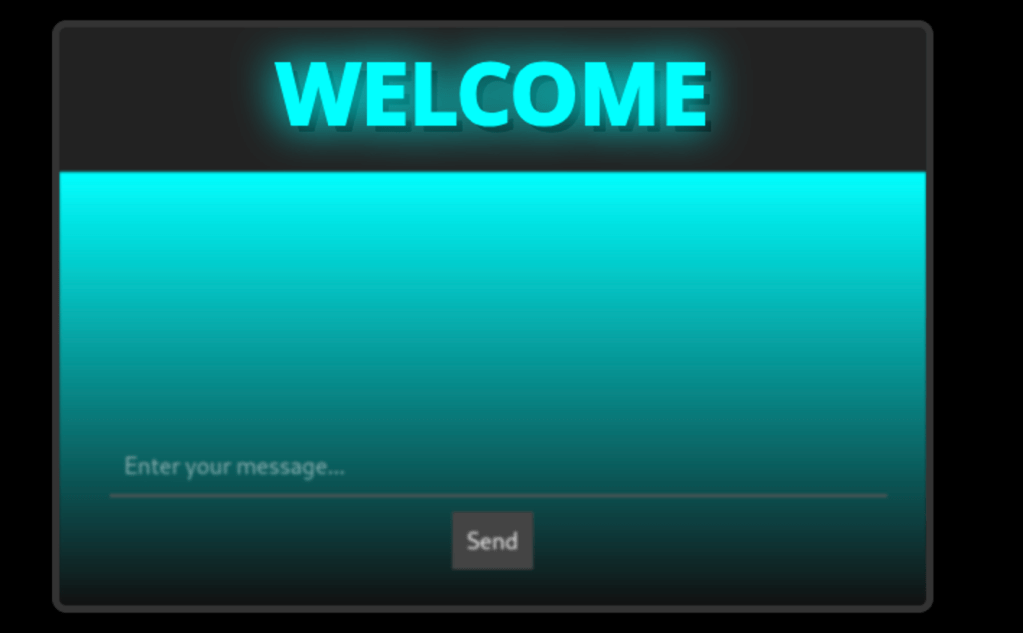
In this article, we will walk through the step-by-step creation of a road sign board featuring a 3D neon text effect along with a gradient background that illuminates from top to bottom. The neon text is customizable at the code level, meaning that the developer can change it directly in the JavaScript file without relying on user input. The board also includes a form that sits over the gradient background.
The project is divided into three main files:
- index.html: Contains the basic HTML structure of the page, including the container for the road sign board, the canvas for the neon text, and the lower gradient section with the form.
- styles.css: Defines the visual styles for the board, the canvas, the gradient background, and the form. It sets the overall look reminiscent of a street sign.
- script.js: Contains the JavaScript code that draws the neon text on the canvas with a pseudo-3D effect, handles the flickering animation, and updates the gradient background based on the neon’s state.
File Breakdown
1. index.html
This file establishes the structure of the web page. It includes the canvas for the neon effect at the top and the gradient area with the form below. The file also links to the external CSS and JavaScript files.
<!DOCTYPE html>
<html lang="en">
<head>
  <meta charset="UTF-8">
  <meta name="viewport" content="width=device-width, initial-scale=1.0">
  <title>Customizable 3D Neon Road Sign Board</title>
  <link rel="stylesheet" href="styles.css">
</head>
<body>
  <!-- Board container -->
  <div id="board">
    <!-- Neon area at the top -->
    <canvas id="neonCanvas" width="600" height="100"></canvas>
    <!-- Gradient background area with form -->
    <div id="gradientBackground">
      <form id="streetSignForm">
        <input type="text" placeholder="Enter your message..." required>
        <button type="submit">Send</button>
      </form>
    </div>
  </div>
  <script src="script.js"></script>
</body>
</html>
Key Points:
- The
<canvas>element with the IDneonCanvasis used to draw the neon text. - The
#gradientBackgrounddiv creates a gradient that illuminates from the top down. - The form is placed over the gradient using absolute positioning.
- External CSS and JavaScript files are linked for a modular setup.
2. styles.css
This file sets the visual appearance of the board. It includes styles for the overall body, board container, neon canvas, gradient background, and form. The CSS ensures that the board resembles a street sign with modern neon effects.
body {
  background: #000;
  font-family: 'Arial Black', sans-serif;
  margin: 0;
  padding: 20px;
  text-align: center;
  color: #fff;
}

/* Board container */
#board {
  width: 600px;
  margin: 0 auto;
  background: #222;
  border: 5px solid #333;
  border-radius: 10px;
  overflow: hidden;
  position: relative;
  box-shadow: 0 0 20px #000;
}

/* Neon area (canvas) at the top */
#neonCanvas {
  width: 100%;
  height: 100px;
  background: transparent;
  display: block;
}

/* Gradient background area with dispersion effect */
#gradientBackground {
  height: 300px;
  position: relative;
  background: linear-gradient(to bottom, rgba(0,255,255,1) 0%, rgba(0,0,0,0.5) 100%);
  filter: blur(1px);
}

/* Form positioned over the gradient */
#streetSignForm {
  position: absolute;
  width: 90%;
  bottom: 20px;
  left: 5%;
  z-index: 2;
}

#streetSignForm input,
#streetSignForm button {
  padding: 10px;
  font-size: 16px;
  margin: 5px;
}

#streetSignForm input {
  width: calc(100% - 22px);
  border: none;
  border-bottom: 2px solid #555;
  background: transparent;
  color: #fff;
  outline: none;
}

#streetSignForm button {
  background: #444;
  border: none;
  cursor: pointer;
  color: #fff;
  transition: background 0.2s;
}

#streetSignForm button:hover {
  background: #666;
}
Key Points:
- The
#boardcontainer is styled to have a dark background with a defined width, rounded borders, and a subtle box shadow. - The canvas is set to be fully transparent to allow the neon effect to stand out.
- The gradient background creates a light dispersion effect from cyan at the top to a darker tone at the bottom.
- The form is styled to be minimal and blends in with the overall neon and street sign theme.
3. script.js
This JavaScript file is the heart of the project. It draws the neon text on the canvas with a pseudo-3D effect by creating an offset shadow. The code also applies a random flickering effect and updates the gradient background to match the neon’s intensity.
// Developer-level customizable neon text
let neonText = "WELCOME";

const neonCanvas = document.getElementById('neonCanvas');
const ctx = neonCanvas.getContext('2d');
const gradientBackground = document.getElementById('gradientBackground');

let neonOn = true; // Neon state for flickering

// Function to draw the neon text with a pseudo-3D effect
function drawNeon() {
  ctx.clearRect(0, 0, neonCanvas.width, neonCanvas.height);

  // Parameters for the 3D effect
  const offset = 5; // Offset for depth effect

  // Determine glow intensity and text opacity based on neon state
  let glowIntensity = neonOn ? 30 : 10;
  let textAlpha = neonOn ? 1 : 0.3;

  // Draw the shadow (3D effect) – lower layer
  ctx.save();
  ctx.font = "bold 60px sans-serif";
  ctx.textAlign = "center";
  ctx.textBaseline = "middle";
  ctx.fillStyle = "rgba(0,0,0,0.8)"; // Shadow color to simulate depth
  ctx.fillText(neonText, neonCanvas.width / 2 + offset, neonCanvas.height / 2 + offset);
  ctx.restore();

  // Draw the main neon text with glow effect
  ctx.save();
  ctx.font = "bold 60px sans-serif";
  ctx.textAlign = "center";
  ctx.textBaseline = "middle";
  ctx.shadowBlur = glowIntensity;
  ctx.shadowColor = "cyan";
  ctx.fillStyle = `rgba(0,255,255,${textAlpha})`;
  ctx.fillText(neonText, neonCanvas.width / 2, neonCanvas.height / 2);
  ctx.restore();

  // Draw the outline of the text to enhance the neon effect
  ctx.save();
  ctx.font = "bold 60px sans-serif";
  ctx.textAlign = "center";
  ctx.textBaseline = "middle";
  ctx.lineWidth = 2;
  ctx.strokeStyle = `rgba(0,255,255,${textAlpha})`;
  ctx.shadowBlur = glowIntensity;
  ctx.shadowColor = "cyan";
  ctx.strokeText(neonText, neonCanvas.width / 2, neonCanvas.height / 2);
  ctx.restore();
}

// Function to update the gradient background of the board
function updateGradientBackground() {
  // Vary the gradient's intensity based on the neon state
  let intensity = neonOn ? 1 : 0.4;
  gradientBackground.style.background = `linear-gradient(to bottom, rgba(0,255,255,${intensity}) 0%, rgba(0,0,0,0.5) 100%)`;
}

// Function to handle the random flickering of the neon
function flicker() {
  // Neon is on about 70% of the time
  neonOn = Math.random() > 0.3;
  drawNeon();
  updateGradientBackground();

  // Set a random interval between 50 and 300 milliseconds for flickering
  const randomInterval = Math.random() * 250 + 50;
  setTimeout(flicker, randomInterval);
}

// Initialization
drawNeon();
updateGradientBackground();
flicker();

// Form submission handler (customize action as needed)
document.getElementById('streetSignForm').addEventListener('submit', function(e) {
  e.preventDefault();
  alert("Message sent!");
});
Key Points:
- Customizable Neon Text:
The variableneonTextdefines the text that appears on the neon sign. In this example, it is set to “WELCOME” and can be modified by the developer. - Pseudo-3D Effect:
The code creates a pseudo-3D effect by first drawing a shadow (offset by a few pixels) behind the main text. This simulates depth and makes the neon sign look more dynamic. - Glow and Outline Effects:
The neon text is rendered with a glow using theshadowBlurandshadowColorproperties. An outline is drawn withstrokeTextto further accentuate the neon look. - Random Flickering:
Theflicker()function randomly toggles the state of the neon (on or off) and updates both the canvas and the gradient background accordingly. This creates a realistic flickering effect typical of neon lights. - Dynamic Gradient Background:
The gradient background is updated to change its brightness in sync with the neon text’s flickering, enhancing the overall visual impact. - Form Handling:
A simple form is provided for user interaction, with an event listener that currently triggers an alert when the form is submitted. This can be extended for further functionality.
Conclusion
The project presented here demonstrates how to create a visually striking road sign board with a 3D neon effect using modern web technologies. By separating the code into HTML, CSS, and JavaScript files, the solution is both modular and easy to customize. The neon effect, complete with glow, outline, and a realistic flickering animation, combined with a dynamic gradient background, makes this design ideal for interactive interfaces and creative web projects.
This detailed explanation should serve as an excellent starting point for developers looking to implement advanced canvas graphics and dynamic styling effects in their web applications. Enjoy experimenting and customizing the neon text to suit your project’s needs!
 Alessio Puppi's Alchemy